


Marshalls Official
4.1576.00 Reviews
App Specs
- Version
- 17.1.1
- Updated On
- License
- Free
- Downloads
- 1,000,000+
- Developer
- The TJX Companies, Inc
- Categories
- Shopping
- Platform
- Android
Screenshots
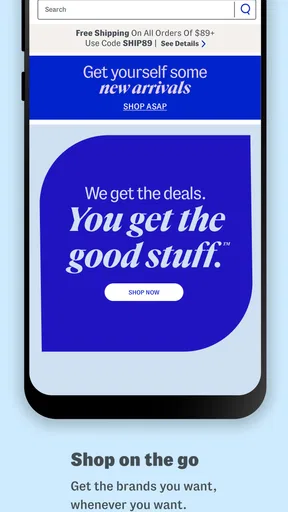
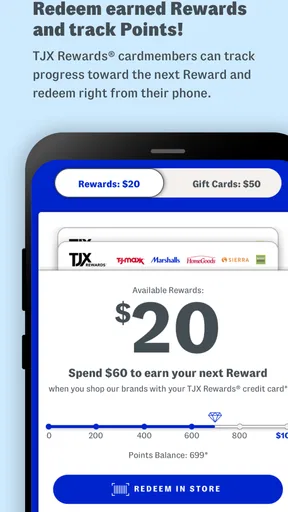
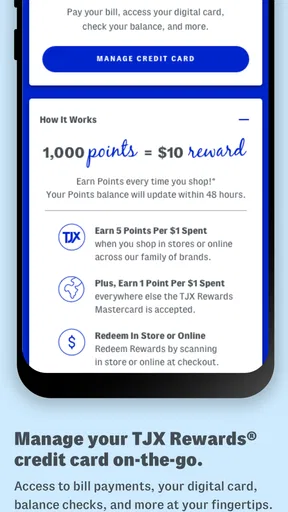
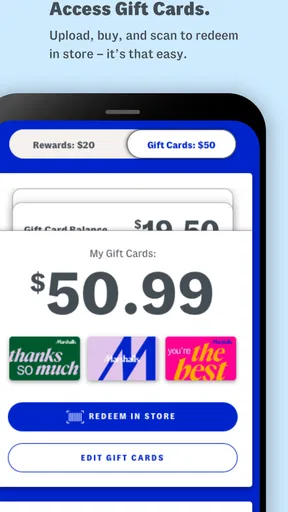
 Analysis by AppCompare
Shopping at Marshalls is usually less about following a fixed catalog and more about being ready when an unexpected find appears. The official Marshalls app is built around that feeling, giving me a mobile way to stay connected with the retailer while I browse, plan a store visit, and keep an eye out for the kind of changing selection that makes discount shopping interesting. It is a free shopping app from The TJX Companies, Inc., intended for everyone and available on supported devices running OS 10 or later.
My first impression is that this is not an app I would use in exactly the same way as a traditional online department store. I would not open it expecting an enormous, permanent inventory with every size and color always available. Instead, I see it as a companion for Marshalls shoppers: useful when I want to explore what the brand is presenting, get into a shopping mindset, or make a store trip feel more purposeful. That distinction matters because the best experience comes from treating it as a discovery tool rather than a guarantee that a particular bargain will still be waiting.
What to expect from Marshalls Official
Marshalls Official sits in the Shopping category and has reached more than a million installs, with an average rating of 4.1 from around 1.7 thousand ratings. Those numbers suggest a reasonably established app with a generally positive reception, although they do not remove the need to decide whether its style of shopping suits you. The app was released on September 24, 2019, and the current version is 17.1.1.
The store summary presents the app as a place for fresh shopping surprises, and that is a fair way to understand its personality. Marshalls is known for the appeal of finding something different from one visit to the next, so a digital experience connected to the brand naturally works best when I am open to browsing rather than searching for one guaranteed product. If I already know the exact item I need today, a conventional retailer with dependable stock information may be more efficient.
For a first-time user, the main expectation should be simple: install it, look around without pressure, and decide whether the content helps you plan your next Marshalls visit. I would not judge the app solely by how quickly it lets me complete a purchase. Its value can also come from helping me notice categories, seasonal ideas, or products I might otherwise overlook.
The app is free, which makes trying it low-risk. The age rating is Everyone, so it is positioned as a broadly accessible shopping experience rather than something aimed at a narrow audience. That does not mean every user will find it equally useful. Someone who dislikes browsing, wants detailed product comparison, or needs a highly predictable checkout journey may prefer another shopping method.
How I would begin after installing it
I recommend starting with a short, relaxed session instead of trying to explore every part immediately. Once the app opens, I would first identify the main shopping areas and learn how the navigation is organized. The goal is not to memorize the interface; it is to understand where the app puts discovery, store-related information, and any account or shopping controls that matter to me.
Worth Reading Before You Choose

EA SPORTS FC Mobile 26 Is a Bigger Football Game, but It Takes Time

Flipboard Shows What News Apps Must Do Beyond the Feed

Switching to Android Auto Means Rethinking Your Driving Routine

Google Calendar Makes a Crowded Week Easier to Manage

Ludo King Makes the Most of the Minutes Between Plans

Baby Panda World Brings Quick Play to Modern Phones, but Its Game Library Feels Busy
I would also take a moment to check whether the app asks me to sign in before I can use the parts I care about. If an account is optional for browsing, I would begin without creating one and only register when a specific feature makes that worthwhile. This keeps the first experience focused and avoids entering personal details before I know how often I will use the app.
A useful first setup habit is to think about the type of shopping trip I actually make. If I visit Marshalls for home items, clothing, footwear, or gifts, I would use that purpose to guide my first browse. A focused goal makes the app easier to evaluate than scrolling without a plan. It also gives me a practical answer to the question, “What did this app help me do today?”
I would not spend the first session trying to build an elaborate shopping routine. Marshalls works especially well for occasional discovery, so the setup should stay light. Browse the available sections, note anything relevant, and close the app if nothing catches my attention. A shopping app should save me effort, not create another task I feel obliged to maintain.
Reaching a useful first result
For me, the first meaningful success would be turning a vague intention into a concrete plan. For example, if I need a small housewarming gift, I could open the app, explore the areas connected with home or gifting, and make a short mental list of what to look for during my next store visit. The app has done its job if I leave with a clearer idea of what I want to investigate, even if the final purchase happens in person.
Another realistic scenario is preparing for a weekend shopping trip. I might browse before leaving home, notice a category that fits my budget or the season, and then visit a nearby Marshalls with a more specific purpose. This is more useful than wandering through the store with no direction, but it still leaves room for the unexpected finds that make Marshalls different from a standard online catalog.
My advice is to save screenshots or notes only when they serve a clear purpose, such as remembering a style or gift idea. I would avoid assuming that seeing something in the app means the identical item will be waiting at a particular location. Discount retail inventory can change, and that uncertainty is part of the trade-off. The app can inspire and guide a trip, but I would still keep a backup idea in mind.
If the first session does not lead to a purchase, I would not consider it a failure. A successful first action could simply be identifying the right section, learning how the app presents Marshalls products, or deciding that the app is most useful before occasional store visits. That is a more honest measure than expecting every opening to end with an order.
Where new users may get confused
The biggest possible confusion is the difference between browsing inspiration and dependable product availability. A traditional online shop often trains us to search for an item, see a stock status, and place it in a cart. Marshalls has a more changeable, treasure-hunt character. I would therefore treat any product discovery as a lead rather than a promise, especially if I am planning a trip around one particular item.
Another point to watch is the difference between the app and the physical store experience. The app may help me understand the brand’s current shopping direction, but it cannot fully reproduce the pleasure of seeing unexpected products together on a store visit. If I prefer touching fabrics, checking fit, comparing colors in person, or making an immediate decision, the app should support that process rather than replace it.
I would also avoid opening the app only when I am already in a hurry. A rushed search can make any changing-inventory retailer feel frustrating. When I have five minutes before a trip, I can browse for broad ideas. When I need a specific item immediately, I would use a retailer or local shopping option that provides more direct certainty. The right expectation is flexible discovery, not guaranteed availability.
Users who are careful about spending should set a purpose before browsing. The surprise element can be enjoyable, but it can also encourage impulse purchases. I find it easier to stay disciplined when I decide whether I am shopping for a gift, a household need, or a particular type of clothing before I start looking. The app can then help me explore without becoming an invitation to buy everything interesting.
There is also a practical trade-off between using the app and simply visiting a Marshalls store. The app is more convenient for early planning and browsing from home. The store is better for checking fit, inspecting condition, comparing several unexpected alternatives, and completing a spontaneous find. Neither option completely replaces the other, and the strongest routine uses each for what it does best.
Small habits that make it more useful
One useful habit is to browse at the beginning of a shopping decision, not at the end. If I wait until I have already decided exactly what I want, I may become annoyed when the app cannot provide the certainty of a specialized retailer. If I use it earlier, it can broaden my options and help me notice a different route to the same goal.
A second habit is to translate browsing into a store checklist. Instead of remembering one product image, I would write down the qualities that matter: a neutral color, a practical size, a gift suitable for a certain person, or a general home style. This makes the app’s inspiration more durable and prevents disappointment if the exact item changes before I shop.
A third insight is that the app is particularly suitable for shoppers who enjoy comparison by category rather than comparison by brand. If I want to see several possible directions for a gift or room refresh, Marshalls’ discovery-oriented identity can be helpful. If I am loyal to one exact brand and need a precise model, I would probably start with that brand’s own app or a retailer with a more stable catalog.
I would also use the app as a conversation starter when shopping with someone else. Before a trip, we could browse for broad ideas and agree on the kind of item worth looking for. That reduces aimless browsing in the store while preserving the chance to find something neither of us expected. It is a small workflow, but it makes the app feel more useful than a passive stream of products.
Who should use it, and who may prefer another option?
I think the app is a good fit for regular Marshalls shoppers, bargain hunters who enjoy variety, and people who like preparing for a store visit without committing to a rigid list. It can also suit gift shoppers who want several directions to consider, especially when they are not yet sure whether the right answer is clothing, accessories, or something for the home.
It is less suitable for someone who needs a guaranteed item by a fixed deadline. In that situation, a retailer with live, location-specific stock and a clearly defined delivery or pickup process may be the better choice. I would also point shoppers toward a more specialized app when they need technical product specifications, extensive customer reviews, or a long-term comparison between identical models.
People who dislike surprise-based shopping may find the experience less satisfying. Marshalls’ appeal depends partly on accepting that the selection can change. If your ideal app experience is a perfectly organized catalog with predictable replenishment, this may feel less direct. That is not necessarily a flaw, but it is an important personality difference.
On the other hand, users who find ordinary shopping repetitive may appreciate the change of pace. I like that the app can help me approach a store visit with curiosity while still giving me a starting point. The experience is strongest when I want ideas and flexibility, not when I want a single guaranteed answer.
My overall take after using it
Marshalls Official is a straightforward free shopping companion for people who enjoy the retailer’s changing, discovery-led style. Its strongest role is helping me prepare, browse, and form a realistic shopping plan before visiting a store. The app is not the best replacement for a highly predictable online marketplace, and I would not use it as my only tool for urgent or exact-item shopping.
The current version, 17.1.1, keeps the app relevant for users on OS 10 or later, while its established presence and broad audience make it easy to try without much commitment. I would begin with one specific goal, spend a few minutes learning the layout, and judge the experience by whether it makes my next shopping decision easier. That approach avoids both unrealistic expectations and unnecessary effort.
My recommendation is positive, with a clear condition: use it as a guide to Marshalls’ world of changing finds, not as a promise that a particular product will remain available. For a casual browse, gift inspiration, or a better-planned store trip, it can be genuinely handy. For exact searches, detailed comparison, or guaranteed timing, I would choose a more inventory-focused alternative. Knowing that difference is what turns this app from a random download into a useful part of a shopping routine.
Pros
- Easy access to Marshalls deals
- discounts
- and seasonal promotions.
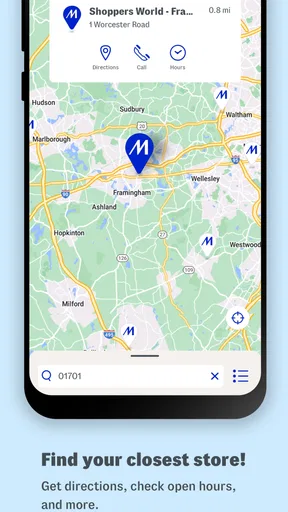
- Store locator helps find nearby locations and check opening hours.
- Simple interface makes browsing departments and products straightforward.
- Useful notifications can highlight new offers and shopping events.
- Official source for Marshalls updates
- policies
- and customer information.
Cons
- Product availability can vary greatly between stores and change quickly.
- Some features may redirect users to the mobile website.
- Notifications may feel excessive if promotional alerts are enabled.
- The app may offer limited details for individual in-store products.
- Online shopping options may be less comprehensive than larger retailers.
FAQs for Marshalls Official
What is Marshalls Official?
Marshalls Official is the mobile shopping experience for Marshalls, the off-price retailer known for clothing, shoes, accessories, beauty products, home décor, and seasonal finds. The app or mobile platform is designed to help shoppers browse available merchandise, discover new arrivals and promotions, and stay connected with the Marshalls brand. Product selection and availability can vary by location and may change frequently.
Can I buy Marshalls products directly through the app?
Shopping functionality may depend on the current version of Marshalls Official and the services available in your region. Marshalls is primarily known for its in-store treasure-hunt shopping experience, so not every item found in a store will necessarily appear online or be available for delivery. Before downloading, check the app listing and its official features to confirm whether online purchasing, account services, or store-related tools are supported.
Does Marshalls Official show inventory at nearby stores?
The availability of store inventory can be limited because Marshalls merchandise changes quickly and many products are sold in small quantities. If the app provides store information or product browsing, it may help you locate nearby locations, opening hours, directions, or selected details, but it should not always be treated as a real-time inventory guarantee. Calling the store directly may be helpful for a specific item.
Is Marshalls Official free to download and use?
The official Marshalls app should generally be free to download, although normal mobile data charges may apply when browsing products, promotions, maps, or other online content. The app itself should not require a purchase simply to install or explore its basic features. Be careful to download it only from the official Google Play Store or Apple App Store, verify the developer information, and avoid unofficial copies or suspicious download websites.
What permissions and personal information does Marshalls Official require?
Depending on the platform and features enabled, Marshalls Official may request access to information such as your location for nearby-store services, notifications for promotions, and account details if you choose to register or use shopping-related functions. Review the permissions and privacy policy before accepting them. You can usually manage notification, location, and other permissions later through your Android or iOS device settings.


